
By Ali Rind on April 29, 2026

If your team is storing case evidence in Google Drive, Dropbox, OneDrive, or SharePoint, you are using a tool that was never designed for the job. These platforms are excellent at what they do. Evidence handling is not it.
The gap is not a feature gap. It is a defensibility gap. Chain of custody, tamper-evidence, role-based access tied to cases, and retention policies are baseline requirements for any legally sensitive file. Consumer cloud storage tools handle none of these properly, and that exposure does not surface until an audit, a FOIA challenge, or a courtroom moment makes it expensive.
This post breaks down exactly how evidence management software compares to cloud storage, so you can make an informed decision about what your organization truly needs.
This guide compares evidence management software to the cloud storage tools your team is probably already using, with the specific risks each one introduces when handling evidence.
What Cloud Storage was Actually Built For
Google Drive, Dropbox, OneDrive, Box, and SharePoint were built for one job: file sharing and collaboration. They sync documents across devices, let teams co-edit in real time, and make it easy to share a link. For business reports, marketing assets, and HR documents, they work well.
Evidence is a different category of file. It needs a documented, tamper-evident, traceable lifecycle from the moment it is collected to the moment it is disposed of or shown in court. The platforms above were built for productivity, not for evidentiary integrity. Using them for evidence is not a workflow compromise. It is a legal one.
What About Google Drive, Dropbox, SharePoint, and OneDrive Specifically?
-
Google Drive. Tracks file edits and download events at a basic level. Permissions are folder-based, easy to misconfigure, and trivial to over-share. No native chain of custody log, no required reason for access, no integrity verification. Workspace audit logs exist for admins but were not designed to meet evidentiary standards.
-
Dropbox. Strong at sync, weak at governance. Sharing controls are per-link rather than per-case. Activity logs show file events but not the structured access record courts and auditors expect. No native legal hold or evidence-grade retention enforcement.
-
SharePoint and OneDrive. Closer to enterprise document management than the others, with check-in/check-out, retention labels, and audit logs. But the controls are designed for corporate document governance, not evidence. Retention labels are not the same as defensible disposition records. Audit logs are not the same as a court-ready chain of custody. Permissions are inheritable across folders in ways that introduce risk for case-isolated material.
The common thread: these tools are good at letting people share files. They are not built to prove that a file has not been touched, that access was authorized, that retention rules were enforced, or that disposition was defensible.
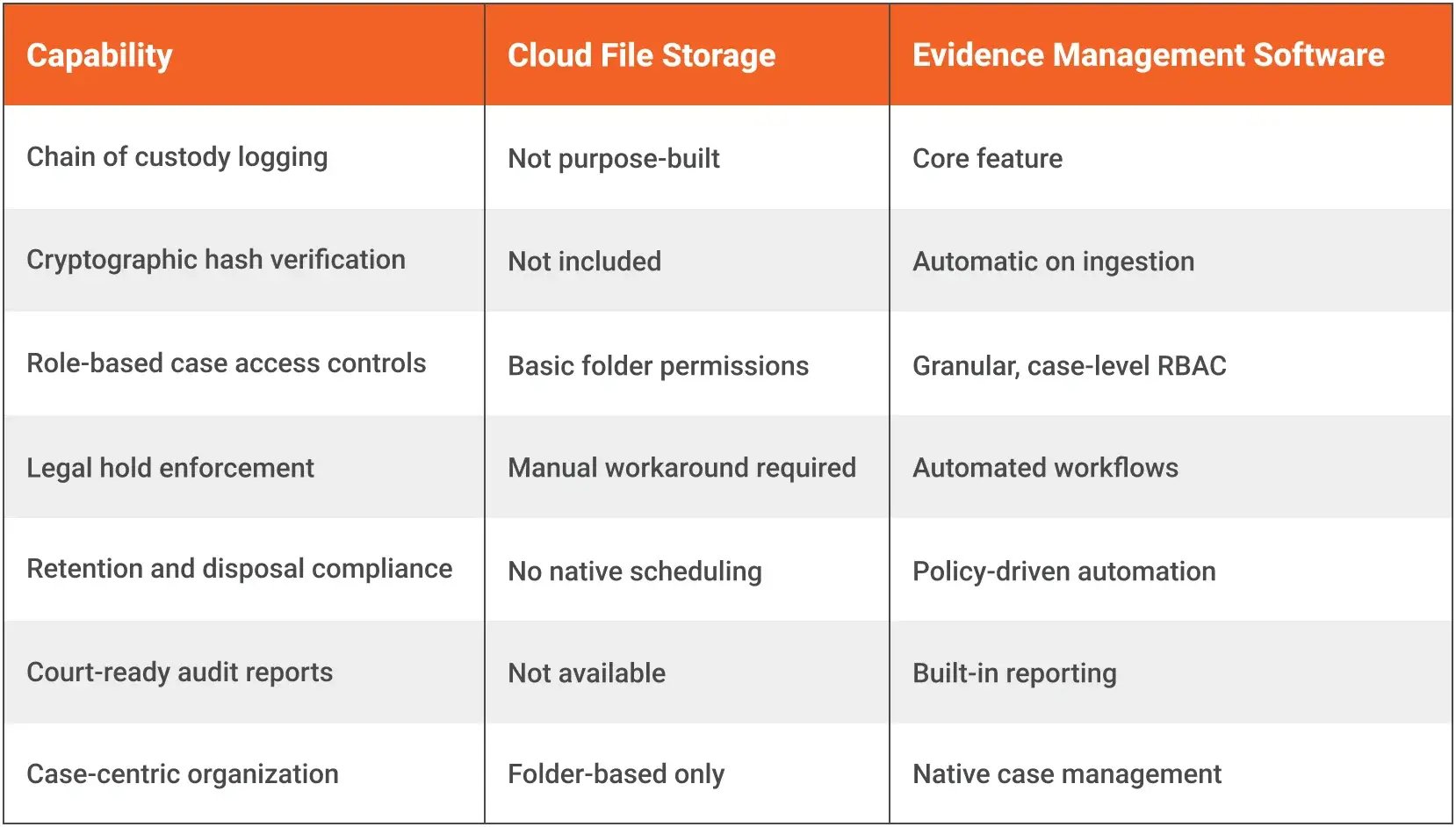
The Core Differences: Evidence Management Software vs. Cloud Storage
1. Chain of Custody: The Deal-Breaker
Chain of custody is the documented, unbroken record of who handled a piece of evidence, when, and why. In legal proceedings, a broken or undocumented chain of custody can render evidence inadmissible, potentially sinking an entire case.
Basic cloud storage tracks file edits and downloads at a surface level, but it does not create a formal, legally structured chain of custody log. Files can be moved, renamed, shared, or deleted with little more than a timestamp. There is no formal check-in/check-out mechanism, no required reason for access, and no audit trail designed to meet evidentiary standards.
Evidence management software is built around chain of custody as a foundational feature. Every access event, including who viewed a file, who transferred it, and who modified permissions, is automatically logged in a court-ready audit trail. Many platforms require users to document a reason before accessing a file. This is not just good practice; it is often a legal requirement.
2. Tamper-Evidence and File Integrity Verification
When evidence is submitted in court, opposing counsel or internal auditors may challenge whether a file has been altered since it was originally collected. If you cannot prove the file is unchanged, your credibility is compromised.
Cloud storage tools generally do not provide cryptographic file integrity verification. Version history exists, but it does not prove a file was not manipulated before upload.
Evidence management software uses hash verification through SHA-256 checksums to create a digital fingerprint of every file at the moment of ingestion. Any subsequent alteration, even a single byte, produces a different hash, making tampering immediately detectable and documentable. This level of integrity verification is a standard capability of purpose-built evidence management software and is simply not available in basic cloud storage.
3. Access Controls Built for Accountability
Cloud storage offers folder-level permissions, but those permissions are designed for team productivity, not evidentiary access governance. It is relatively easy for an admin to share a folder broadly, grant temporary access, or accidentally expose sensitive case files to the wrong person.
Evidence management software enforces role-based access control tied specifically to cases and evidence types. Access is granted on a need-to-know basis by case rather than by folder hierarchy. Some platforms also enforce two-factor authentication at the evidence level and require supervisory approval before sensitive materials can be accessed or exported. This is a critical distinction when evaluating evidence management software vs. cloud storage for compliance-sensitive environments.
4. Retention, Disposal, and Legal Hold Compliance
Evidence does not live forever, but disposing of it incorrectly creates serious legal and compliance exposure. Regulatory frameworks, court orders, and internal policies all govern how long certain types of evidence must be retained and how it must be destroyed.
Cloud storage has no native mechanism for enforcing evidence-specific retention schedules, flagging items under legal hold, or generating certificates of destruction. Managing this manually in a shared drive is error-prone and leaves organizations vulnerable during audits or litigation.
Evidence management platforms include automated retention scheduling, legal hold workflows, and defensible disposal processes with full documentation. When an auditor asks why a file was deleted, you have a documented, policy-driven answer ready. For a deeper look at how government agencies manage this in practice, see our guide on retention and legal hold compliance for digital evidence.
5. Case-Centric Organization vs. Folder-Based Storage
In cloud storage, organization is file-system based. You create folders, subfolders, and naming conventions that depend entirely on human discipline to maintain. As teams grow and case volumes increase, folder structures become inconsistent, files end up in the wrong place, and critical evidence becomes difficult to locate under pressure.
Evidence management software organizes data around cases and matters, not folders. Evidence is linked to specific cases, incidents, subjects, and investigations. Search, filtering, and reporting are all built around this case-centric model, making it dramatically faster to locate what you need and generate case-level reports for prosecutors, regulators, or internal leadership. Purpose-built platforms go even further, with AI-powered evidence search and analysis that allows investigators to surface critical details across video, audio, and images in minutes, something no folder structure can replicate.
6. Reporting and Audit Readiness
When an audit, lawsuit, or regulatory inquiry arrives, you need to produce documentation quickly and accurately. Cloud storage was never designed to generate chain of custody reports, evidence logs, or access histories in a structured, court-ready format.
Evidence management systems include built-in reporting modules that produce audit-ready documentation in minutes. Chain of custody reports, access logs, retention compliance summaries, and case disposition records are all formatted to meet legal and regulatory standards. See how law enforcement agencies build court-ready evidence workflows that hold up to prosecutorial and judicial scrutiny from the moment evidence is collected.
Who is Most Exposed Using Cloud Storage for Evidence
The gap shows up hardest for organizations whose work depends on evidentiary defensibility:
- Law enforcement agencies managing body camera, surveillance, and mobile device evidence
- Corporate legal and compliance teams handling internal investigations and regulatory inquiries
- Insurance companies managing claims investigation files
- Healthcare organizations managing incident documentation and HIPAA-relevant records
- Government agencies managing FOIA requests or inter-agency investigations
If any of these describe your organization and you are currently storing evidence in Google Drive, Dropbox, SharePoint, OneDrive, or Box, the exposure is real even if it has not surfaced yet.
"Nothing Has Gone Wrong Yet" is the Most Expensive Position
This is the most common reason organizations delay the switch. The urgency feels low because nothing has failed.
Evidentiary failures usually do not surface until they are catastrophic. A chain of custody challenge that throws out key evidence. A compliance audit that exposes inadequate retention practices. A breach involving sensitive case files. A motion that argues your evidence handling was insufficient. By the time any of those land, the cost of switching is far higher than it would have been if you had moved earlier.
By then, the cost of switching is far higher than it would have been if you had acted proactively.
What to Look for If You are Switching
If you are evaluating a move from cloud storage to evidence management software, the requirements that actually matter are:
- Automated chain of custody logging with tamper-evident audit trails
- File integrity verification through cryptographic hashing at ingestion
- Case-centric data architecture with granular role-based access
- Legal hold and retention management with policy enforcement
- Integration with existing tools such as RMS, CAD, body cam systems, and case management platforms
- Compliance alignment with relevant standards including CJIS, HIPAA, and SOC 2
- Defensible disposal workflows with full documentation
Not sure what to prioritize during evaluation? This breakdown of the evidence management software features law enforcement agencies rely on most is a good place to start. If your organization is in active procurement, this guide on evaluating evidence management software covers the specific capabilities government buyers should validate before making a decision.
The Decision is About Defensibility, Not Features
Cloud storage tools are excellent at what they were built for. Evidence management is not that purpose.
When the stakes include legal admissibility, regulatory exposure, and organizational accountability, the infrastructure you use to handle evidence has to be purpose-built for the job. The gap between a shared folder and a compliant evidence management platform is not a feature gap. It is a risk gap.
The question is not whether your organization can technically store evidence in the cloud. It is whether you can defend that decision when it matters most.
Ready to VIDIZMO Digital Evidence Management System for your organization? Start by assessing your current chain of custody documentation process. That is usually where the gaps become most visible, most quickly. Contact us today to speak with an expert and find out how VIDIZMO can help you close those gaps.

Key Takeaways
- Cloud storage was built for file sharing, not evidence. It has no chain of custody logging, hash verification, or legal hold enforcement.
- A broken or undocumented chain of custody can make evidence inadmissible in court.
- Evidence management software automatically generates tamper-evident audit trails on every access event.
- Cryptographic hash verification proves a file has not been altered since ingestion, something cloud storage cannot do.
- Retention scheduling, legal holds, and defensible disposal require purpose-built workflows, not manual folder management.
- The cost of switching is always lower before a failed audit or legal challenge, not after.
About the Author

Jump to

Key Features of Effective Digital Evidence Management Systems

Compliance for Evidence: Legal Standards Governing Digital Evidence


No Comments Yet
Let us know what you think