
By Ali Rind on July 16, 2026
.jpg)
Most law enforcement agencies operate their Computer-Aided Dispatch (CAD), Records Management System (RMS), and Digital Evidence Management System (DEMS) as separate silos. Officers enter the same incident data multiple times. Evidence gets filed without reference to a case number. Investigators spend hours cross-referencing systems that should already be talking to each other.
For IT directors responsible for a public safety technology stack, DEMS CAD RMS integration is not a convenience. It is an operational requirement. When these systems share data, officers spend less time on data entry and more time on investigations. Evidence links automatically to the right case. Chain of custody starts at ingestion, not after a manual upload.
This guide covers the technical architecture behind connecting a DEMS to your existing CAD and RMS, including API patterns, single sign-on (SSO), data flow models, and automation workflows. If you are evaluating how a DEMS fits into your agency's digital evidence lifecycle management strategy, this is where integration decisions get made.
Why CAD, RMS, and DEMS Integration Matters
Each system in the public safety stack serves a distinct purpose:
- CAD dispatches officers and captures incident data in real time, covering call type, location, responding units, and timestamps
- RMS stores official case records, including reports, arrests, citations, and supplemental narratives
- DEMS manages digital evidence, including body-worn camera (BWC) footage, dashcam video, surveillance recordings, interview audio, and documents
Without integration, these systems create redundant workflows. An officer responds to a call logged in CAD, writes a report in RMS, then separately uploads BWC footage to a DEMS and manually tags it with the case number. Each handoff introduces the risk of mislabeled evidence, delayed uploads, and broken audit trails.
Integrated systems eliminate these gaps. CAD incident data flows into the DEMS to pre-populate metadata. RMS case numbers link directly to evidence folders. Officers authenticate once and access all three systems. Evidence events trigger notifications back to the RMS.
Integration Architecture: APIs, WebHooks, and Widgets
A DEMS integration with CAD and RMS relies on three primary technical mechanisms: REST APIs for bidirectional data exchange, WebHook APIs for event-driven notifications, and HTML Widgets for embedded user interfaces.
REST API
A fully documented RESTful API using JSON Web Token (JWT) authentication provides programmatic access to every DEMS function, including content creation, upload, search, management, access restriction, and sharing. The API operates under the context of either a user or an application with restricted permissions, supporting OAuth 2.0 token-based security.
For CAD/RMS integration, the REST API enables:
- Case creation: When a new case is opened in RMS, an API call creates a corresponding case folder in the DEMS with pre-populated metadata (case number, incident type, date, involved parties)
- Evidence linking: Uploaded evidence is automatically associated with the correct case folder using RMS case identifiers
- Metadata synchronization: Officer badge numbers, unit assignments, and incident details from CAD flow into evidence metadata fields
- Search and retrieval: RMS users query the DEMS for evidence associated with a specific case without leaving their records system
WebHook API
Event-driven WebHooks allow external systems to register HTTP endpoints that receive notifications when specific actions occur in the DEMS, such as evidence uploads, playback events, sharing actions, or tamper alerts. This is critical for maintaining chain-of-custody records in the RMS.
Common WebHook patterns for CAD/RMS integration include:
- Evidence uploaded: Notify the RMS that new evidence has been linked to a case
- Evidence shared: Log in the RMS when evidence is shared with a prosecutor or defense attorney
- Tamper detected: Alert the RMS and assigned investigator if SHA-256 hash verification fails
- Retention action: Notify the RMS when evidence is scheduled for disposition or placed on legal hold
HTML Widgets
Embeddable HTML components expose DEMS features, including upload, search, playback, and evidence listing, directly inside the CAD or RMS interface. Officers interact with evidence without leaving their primary system. Widgets support SSO via user credential authentication and application authentication, so no separate login is required.
This approach is particularly effective for agencies that cannot modify their CAD or RMS source code but can embed iframes or web components in their existing interfaces.
Single Sign-On: One Login Across the Stack
Separate credentials for CAD, RMS, and DEMS create friction for officers and security risks for IT administrators. A properly integrated stack uses a single identity provider.
VIDIZMO DEMS supports SSO through any SAML 2.0, OAuth 2.0, or OpenID Connect provider. Out-of-the-box connectors exist for:
- Azure AD (Entra ID): SSO plus SCIM provisioning for automated user management and role assignment
- Okta: SSO via SAML/OAuth
- Ping Identity: SSO via SAML/OAuth
- Active Directory Federation Services (ADFS): SSO via SAML
- ForgeRock, Centrify, OneLogin: SSO via SAML/OAuth
SCIM (System for Cross-domain Identity Management) provisioning automates user lifecycle management. When an officer is added to your identity provider, their DEMS account is created automatically with the correct role and permissions. When they transfer or separate, access is revoked without manual intervention.
This matters for CJIS compliance. The Criminal Justice Information Services (CJIS) Security Policy requires advanced authentication for accessing criminal justice information. Centralizing authentication through a compliant identity provider ensures that every evidence access event is tied to a verified identity with a full audit trail. For a deeper look at how CJIS requirements map to day-to-day evidence workflows, see CJIS Compliance in Digital Evidence Management: Controls That Work.
Data Flow Patterns: CAD to DEMS to RMS
There are three primary data flow patterns for DEMS CAD RMS integration:
Pattern 1: CAD-Triggered Evidence Ingestion
When a CAD incident is created or closed, the system pushes incident metadata to the DEMS via API. The DEMS creates a case folder pre-tagged with the CAD incident number, call type, location, and responding officers. BWC footage from those officers is automatically ingested through Watch Folders, which are monitored network directories that detect new files and upload them to the corresponding case.
Pattern 2: RMS-Driven Case Linking
When an investigator creates or updates a case in the RMS, the system calls the DEMS API to create a linked evidence folder. Any evidence uploaded to that folder inherits the case metadata. Investigators access evidence directly from the RMS interface through embedded HTML Widgets, eliminating the need to switch systems.
Pattern 3: DEMS Event Notifications to RMS
When evidence events occur, such as uploads, shares, redactions, or disposition actions, the DEMS sends WebHook notifications to the RMS. The RMS logs these events against the case record, maintaining a complete chain of custody that spans both systems. To understand how audit trails support this cross-system accountability, see Why Digital Audit Trails Matter in Evidence Management.
Reducing Duplicate Data Entry
The operational payoff of integration is measurable. Without it, officers perform the same data entry across multiple systems, typing case numbers, uploading files, and tagging evidence manually. Each entry point is an opportunity for error.
With DEMS CAD RMS integration:
- Case metadata auto-populates from CAD/RMS into the DEMS, eliminating manual re-entry
- BWC footage auto-associates with incidents based on officer assignment and timestamp correlation via Watch Folders
- Evidence disposition rules inherit from the case type defined in the RMS, applying the correct retention schedule automatically
- Audit logs capture every interaction across systems, producing exportable chain-of-custody reports with IP address, username, timestamp, and event details
For agencies managing high volumes of BWC footage across multiple units, these automations directly address the challenges covered in Top BWC Evidence Management Challenges and How to Solve Them.
How VIDIZMO DEMS Supports CAD and RMS Integration
VIDIZMO DEMS is built on an API-first architecture with REST API, WebHook API, HTML Widgets, SDKs, and configurable connectors as core integration methods, not aftermarket additions.
Key technical capabilities for CAD/RMS integration:
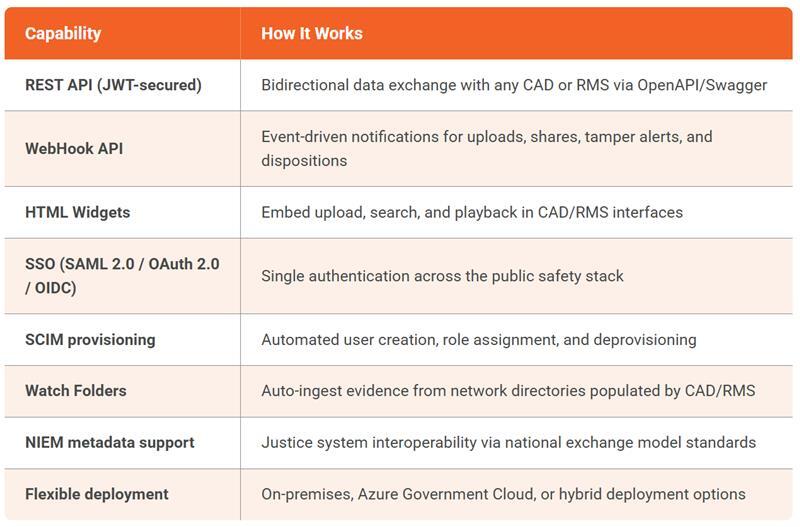
Unlike closed ecosystems that only integrate within their own product families, VIDIZMO connects with any standards-compliant CAD or RMS through open APIs. Agencies retain their existing CAD and RMS investments while adding a DEMS that fits into, rather than replaces, the technology stack they have already built. For a broader look at how a unified platform reduces fragmentation across the full evidence workflow, see Why One Platform Simplifies Digital Evidence for Law Enforcement.
Deployment Considerations for IT Teams
When planning a DEMS CAD RMS integration, IT directors should evaluate:
- API documentation and support: Is the DEMS API fully documented with OpenAPI/Swagger specs? Are SDKs available for your development environment?
- Authentication model: Does the DEMS support your existing identity provider? Can SCIM automate user provisioning?
- Deployment co-location: Can the DEMS deploy on the same infrastructure as your RMS (on-premises, government cloud) to minimize latency and meet data sovereignty requirements?
- Event-driven architecture: Does the DEMS support WebHooks for real-time notifications to your RMS?
- Metadata standards: Does the DEMS support NIEM or other justice information exchange standards?
- Evidence integrity: Does the integration maintain SHA-256 hash verification and chain-of-custody logging across system boundaries?
For a structured checklist of what to look for when selecting a DEMS, the Digital Evidence Management System Selection Guide covers these criteria in detail.
Conclusion
DEMS CAD RMS integration is a technical requirement for any agency that wants to eliminate data silos, reduce officer workload, and maintain an unbroken chain of custody across their public safety technology stack. The integration architecture, covering REST APIs, WebHooks, SSO, and Watch Folders, determines whether a DEMS fits into your existing infrastructure or forces a rip-and-replace.
VIDIZMO Digital Evidence Management System is built for open integration with any CAD or RMS through standards-based APIs and flexible deployment options that match your current infrastructure.
Request a personalized demo to see how VIDIZMO Digital Evidence Management System integrates with your agency's CAD and RMS stack.

People Also Ask
Through REST APIs for bidirectional data exchange, WebHook APIs for event-driven notifications, and HTML Widgets for embedding DEMS features directly in CAD/RMS interfaces. The DEMS API supports JWT-secured, OAuth 2.0 authentication.
Yes. When a CAD incident or RMS case is created, an API call creates a corresponding evidence folder in the DEMS pre-tagged with the incident or case number. Watch Folders can also auto-ingest BWC footage and associate it based on officer assignment and timestamps.
Any SAML 2.0, OAuth 2.0, or OpenID Connect identity provider works, including Azure AD, Okta, Ping Identity, ADFS, ForgeRock, and Centrify. SCIM provisioning automates user account creation and deprovisioning.
Yes. Case metadata from CAD/RMS auto-populates in the DEMS. BWC footage auto-associates with incidents through Watch Folders. Retention schedules inherit from case types. Officers interact with evidence directly from the RMS interface through embedded widgets.
Chain of custody is maintained through SHA-256 tamper detection, comprehensive audit logging (IP address, username, timestamp, event type), and WORM-enabled storage for immutable logs. WebHook notifications log evidence events back to the RMS for a unified audit trail.
About the Author

Jump to

Law Enforcement Evidence Management Software: 15 Must-Have Features
-1.webp)
From Law Enforcement to Prosecution: AI for Evidence Management


No Comments Yet
Let us know what you think